
The majority of the network security strategies focus on traffic monitoring, user authentication, and threat detection. Yet they leave their Ethernet Ports open. Unauthorized LAN access through RJ45 ports can bypass network policies, introduce rogue devices, and compromise sensitive systems, putting compliance, data integrity, and business continuity at risk.
That’s why organizations are turning to RJ45 physical lock kits as a powerful network protection layer.
What Is an RJ45 Physical Lock Kit?
An RJ45 physical lock kit is a hardware-based security solution designed to physically block unauthorized access to Ethernet (LAN) ports. Instead of relying on software rules or network monitoring, these locks prevent devices from being plugged into the network in the first place.
By securing the port itself, RJ45 lock kits eliminate one of the most overlooked entry points into enterprise networks: open and unused LAN ports.
Core Components of an RJ45 Physical Lock Kit-
A typical RJ45 physical lock kit includes two essential elements:
1. RJ45 Port Locks: RJ45 port locks are compact locking devices that fit directly into standard Ethernet ports. Once installed, they:
-
Block the insertion of Ethernet cables
-
Prevent physical tampering or forced removal
-
Sit flush with the port to avoid accidental dislodging.
These locks are designed to be tamper-resistant and compatible with commonly used RJ45 LAN ports across desktops, switches, patch panels, and wall outlets.
2. Locking Keys (Standard vs. Master Key Systems): RJ45 lock kits use mechanical keys to control who can remove or re-enable a port.
-
Standard Key Systems: Each lock is paired with a specific key, suitable for small offices or environments with limited access control needs.
-
Master Key Systems: A single master key can unlock multiple RJ45 locks, making it ideal for large enterprises, data centers, and distributed teams where centralized access control is required.
Key-based access ensures that only authorized IT personnel can enable or disable network ports—no shared passwords, no software overrides.

RJ45 Physical LAN Port Locks
How RJ45 Physical LAN Port Locks Work in Real Environments?
In real-world setups, RJ45 physical lock kits are simple to deploy and require no network downtime:
-
The lock is inserted into an unused or restricted LAN port.
-
The port becomes physically inaccessible to Ethernet cables.
-
Only an authorized keyholder can remove the lock when access is required.
-
This approach works across multiple environments:
-
Office workstations and meeting rooms
-
Network switches and patch panels
-
Public-facing or shared access areas
By combining physical prevention with visibility, RJ45 lock kits act as both a security barrier and a deterrent, making unauthorized network access immediately difficult and obvious.
Why Is Unauthorized LAN Access a Serious Security Threat?
Open Ethernet ports may seem harmless, but they represent one of the most direct and underestimated entry points into an organization’s network. Unlike remote attacks, unauthorized LAN access requires no advanced hacking skills, just physical proximity and a network cable.
In offices, data centers, and public-facing environments, unsecured RJ45 ports can quickly turn into a gateway for data breaches, malware spread, and policy violations.
Risks of Open Ethernet Ports Across Environments
-
Corporate Offices: Vacant desks, meeting rooms, and shared workspaces often have active LAN ports that go unused and unmonitored. These ports can be exploited by visitors, contractors, or even employees connecting unauthorized devices.
-
Data Centers and Server Rooms: Open or improperly secured network ports on switches and patch panels increase the risk of internal breaches and lateral movement within critical infrastructure.
-
Public and Semi-Public Spaces: Reception areas, training rooms, kiosks, and shared facilities expose LAN ports to individuals outside the organization’s security perimeter, making physical access controls essential.
Common Attack Scenarios Enabled by Unauthorized LAN Access
-
Rogue Devices: Attackers or insiders can plug in unauthorized laptops, routers, or IoT devices to gain network access. Once connected, these rogue devices can bypass perimeter defenses and operate unnoticed within the internal network.
-
Network Sniffing: By connecting directly to an Ethernet port, attackers can capture unencrypted traffic, intercept credentials, and monitor sensitive communications, especially in flat or poorly segmented networks.
-
Insider Threats: Employees or contractors with physical access may intentionally or unintentionally connect personal devices, testing equipment, or external storage systems, creating security blind spots and policy violations.
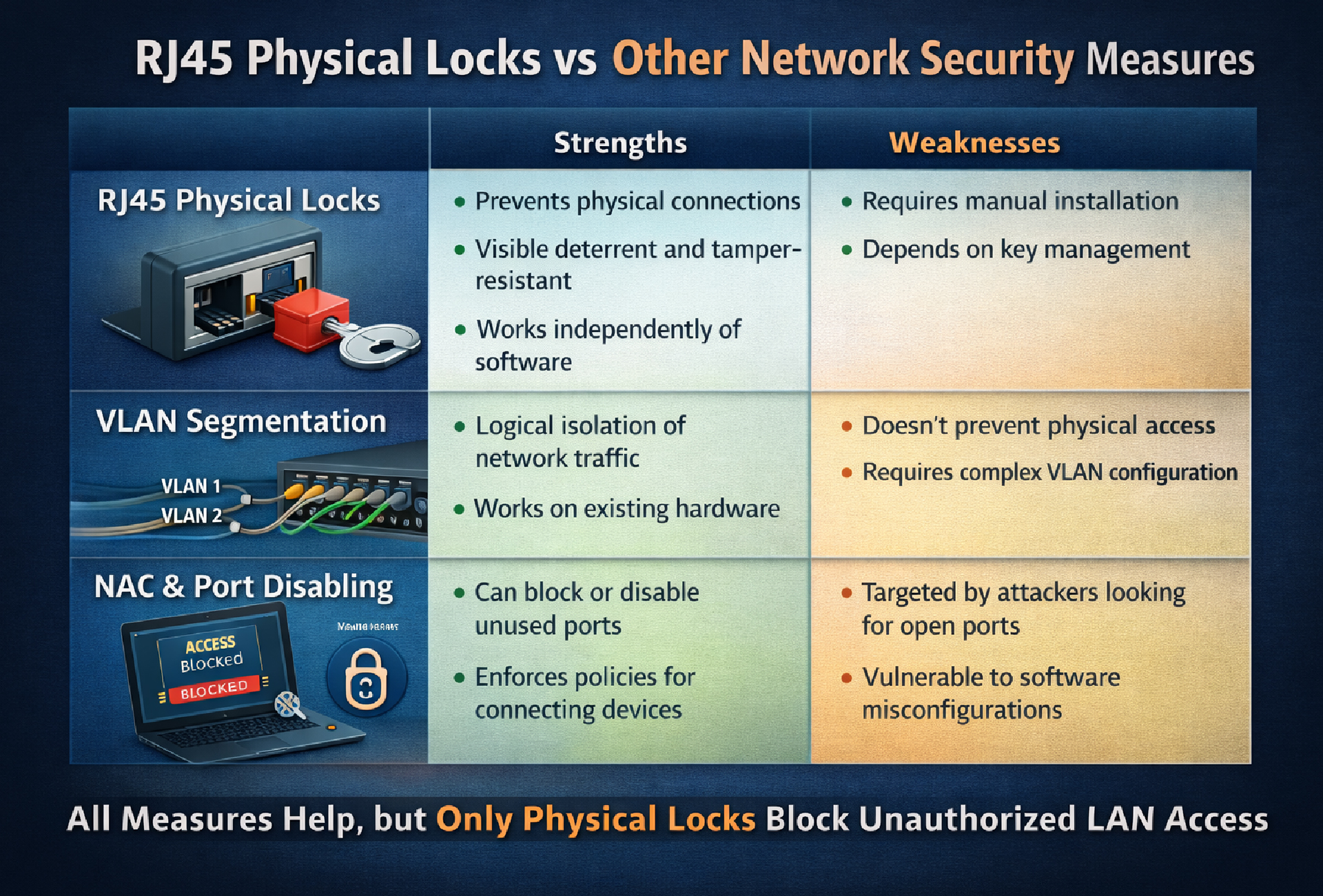
RJ45 Physical LAN Port Locks
Key Features to Look for in an RJ45 Physical Lock Kit
To be effective in enterprise environments, an RJ45 physical lock kit must deliver strong security without operational complexity. These are the key features to evaluate:
-
Tamper-Resistant Design: The lock should sit flush inside the Ethernet port and cannot be removed without the authorized key. A tamper-resistant design prevents forced access and acts as a visible deterrent to misuse.
-
Compatibility with Standard Ethernet Ports: A good lock kit should fit standard RJ45 ports across desktops, switches, patch panels, and wall outlets, allowing consistent deployment across the network without damaging ports.
-
Key Management Options
-
Individual key systems for smaller or highly restricted environments
-
Master key systems for centralized control in large or multi-location deployments
-
The right key model balances access control with operational efficiency.
-
Ease of Installation and Removal: Installation should be quick and require no special tools or downtime. Authorized IT staff must be able to secure or release ports easily during maintenance or access changes.
-
Durability for Enterprise Use: Locks should be built from durable materials to withstand repeated use and long-term deployment across offices, data centers, and shared environments.
Together, these features ensure LAN ports are secure, manageable, and scalable, making physical network protection practical, not disruptive.
How Can Organizations Get Started?
Securing LAN access doesn’t require a full network overhaul. Organizations can take a phased, practical approach to deployment.
Start by assessing current LAN exposure points and identify unused or publicly accessible Ethernet ports in offices, data centers, and shared spaces. These are the highest-risk entry points.
Next, pilot RJ45 physical lock kits in sensitive areas, such as meeting rooms, reception zones, patch panels, and critical network infrastructure. This allows teams to evaluate impact without disrupting operations.
Finally, expand deployment based on security audits and compliance requirements, scaling protection across locations and teams as risks and regulatory obligations grow.