Cable Locking System
It takes less than a minute for a laptop to disappear from an office desk.
No hacking.
No alarms.
No advanced attack.
Just an unattended device and an expensive security incident waiting to happen.
As organizations embrace hybrid work, shared spaces, and mobile IT environments, physical device security has become one of the most overlooked risks in enterprise IT. Cable locking systems are designed to close this gap by securing laptops, desktops, peripherals, and network equipment at the physical level.
This guide explains how cable locking systems work, where IT teams use them, and how to implement them correctly as part of a layered security strategy.
What Is a Cable Locking System?
A cable locking system is a physical security solution designed to prevent the theft, unauthorized removal, or tampering of IT assets such as laptops, desktops, monitors, peripherals, and network equipment. It works by anchoring a device to a fixed object, like a desk, rack, or structural point, using a high-strength steel cable and a locking mechanism.
For IT departments, the purpose of a cable locking system is straightforward yet critical: to reduce physical security risks without disrupting daily operations. It acts as a first line of defense, especially in environments where devices are frequently accessed, shared, or left unattended.
Why IT Departments Need Cable Locking Systems?
As workplaces become more flexible and device-centric, IT departments are facing a growing set of physical security challenges that traditional cybersecurity tools alone cannot address. Cable locking systems help close this gap by protecting devices at the point where risk often begins, physical access.
- Growing Hybrid Work & Shared Workspace Risks: Hybrid work models, hot-desking, coworking spaces, and shared meeting rooms have increased the movement and exposure of IT assets. Laptops, monitors, docking stations, and peripherals are frequently left unattended or used by multiple employees throughout the day. In such environments, unsecured devices become easy targets for theft or misuse. Cable locking systems offer a straightforward method for securing assets without compromising productivity or mobility.
- Insider Threats & Opportunistic Theft: Not all security risks come from external attackers. Insider threats, whether intentional or accidental, remain a major concern for IT teams. Opportunistic theft can occur in seconds, especially in high-traffic areas or during events, training sessions, or office transitions. Cable locking systems act as a visible deterrent, making unauthorized removal difficult and significantly reducing the likelihood of loss.
- Compliance Requirements & Physical Safeguards: Many regulatory and compliance frameworks, including ISO, SOC, HIPAA, and GDPR, require organizations to implement reasonable physical safeguards to protect systems and sensitive data. While they may not mandate specific hardware, they expect organizations to demonstrate control over physical access to IT assets. Cable locking systems support compliance efforts by helping IT teams document and enforce physical security measures as part of a broader risk management strategy.
- Cost of Device Loss vs Cost of Prevention: The true cost of a stolen device extends far beyond hardware replacement. Data exposure, downtime, incident response, compliance penalties, and reputational damage can quickly multiply the impact. Compared to these risks, cable locking systems represent a low-cost, high-return investment, helping IT departments prevent losses before they escalate into security incidents.
Types of Cable Locking Systems Used in IT Environments
Cable Locking System
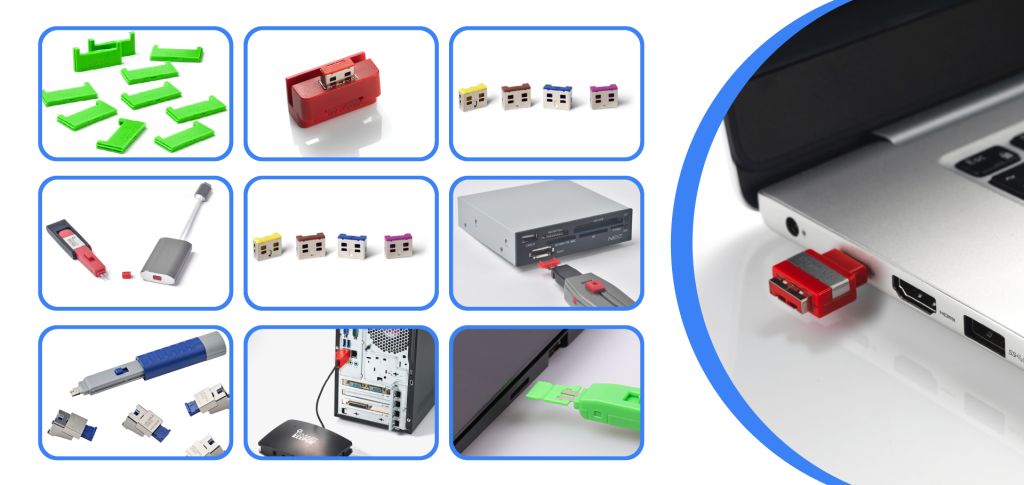
IT departments manage a wide range of devices across different environments, from mobile laptops to fixed workstations and critical network infrastructure. As a result, cable locking systems are designed in multiple formats to address specific use cases while maintaining consistent physical security standards.
-
Laptop & Notebook Cable Locks: Laptops are among the most frequently targeted IT assets due to their portability and high data value. In offices, coworking spaces, and training rooms, employee laptops are often left unattended during meetings, breaks, or shared usage.
Laptop and notebook cable locks secure devices by anchoring them to desks or fixed structures, making quick removal difficult and highly visible. These locks allow employees to continue working normally while providing IT teams with a reliable way to reduce theft risk in open or shared environments.
-
Desktop, PC & Monitor Locks: Fixed workstations may appear secure, but desktops and monitors in shared areas, labs, or customer-facing spaces are still vulnerable to unauthorized removal or tampering. This is especially common in environments with rotating users or limited supervision.
Desktop, PC, and monitor cable locks physically secure equipment to desks or mounting structures, ensuring devices remain in place while still accessible for daily use. This helps IT departments maintain control over shared systems without restricting workflow.
-
Peripheral & Accessory Locks: Peripherals such as keyboards, mouse devices, external hard drives, and docking stations are often overlooked in physical security planning. However, these accessories are easy to remove and frequently contain or enable access to sensitive data.
Peripheral and accessory cable locks help secure smaller but critical components, reducing loss, replacement costs, and potential data exposure. For IT teams, this adds an extra layer of protection across the entire workstation setup, not just the primary device.
-
Server, Network & Data Center Cable Locks: In server rooms and data centers, physical access control is critical. Network devices such as switches, routers, patch panels, and rack-mounted equipment must remain protected from unauthorized removal, accidental disconnection, or tampering.
Server and network cable locking systems secure infrastructure components directly within racks or cabinets, helping IT departments enforce physical access policies and maintain uptime. These locks are particularly valuable in shared facilities, colocation environments, and high-availability data centers.
Common Use Cases for Cable Locking Systems in Organizations
Cable locking systems are used across industries wherever IT assets are shared, mobile, or exposed to unauthorized access. Below are some of the most common organizational use cases.
- Corporate Offices & IT Floors: In open offices, hot-desking setups, and IT floors, laptops and workstations are frequently left unattended. Cable locking systems help prevent opportunistic theft while allowing employees to work without disruption.
- Training Rooms & Shared Workstations: Training environments often involve multiple users, temporary access, and minimal supervision. Cable locks ensure laptops, desktops, and peripherals remain secured during sessions and between uses.
- Hospitals, Labs & Healthcare IT: Healthcare facilities manage sensitive patient data across mobile carts, nursing stations, and diagnostic rooms. Cable locking systems help protect devices while supporting physical safeguard requirements in regulated environments.
- Educational Institutions & Libraries: Schools, colleges, and libraries rely on shared computers and public-access systems. Cable locks reduce equipment loss, protect peripherals, and support long-term asset management.
- Data Centers & Server Rooms: In server rooms and data centers, physical security is critical for uptime and compliance. Cable locking systems secure network devices, servers, and rack-mounted equipment against tampering or unauthorized removal.
How to Choose the Right Cable Locking System for Your Organization?
Selecting the right cable locking system depends on your organization’s IT environment, risk profile, and operational needs. A thoughtful approach ensures effective protection without unnecessary complexity.
- Size of IT inventory: Organizations managing large numbers of devices should prioritize standardized, scalable locking systems that are easy to deploy, manage, and maintain across teams and locations.
- Type of devices to secure: Different devices require different locking solutions. Laptops, desktops, peripherals, and network equipment each have unique security points, so compatibility and versatility are key factors.
- Compliance & industry requirements: Regulated industries such as healthcare, finance, and education must demonstrate physical safeguards for IT assets. Choosing enterprise-grade locking systems supports compliance efforts and audit readiness.
- Budget vs long-term risk mitigation: While cost is important, the potential impact of device loss, data exposure, and downtime is far greater. Investing in reliable cable locking systems helps reduce long-term risk and replacement costs.
In today’s IT environments, security is no longer limited to firewalls and software controls. Physical access to devices remains one of the most common and most preventable risk factors for data loss and operational disruption. Cable locking systems provide IT departments with a simple, effective way to protect laptops, workstations, peripherals, and critical infrastructure without impacting daily workflows.
By choosing the right cable locking solutions and implementing them as part of a layered security strategy, organizations can significantly reduce theft, support compliance requirements, and protect valuable IT assets at a relatively low cost. For IT teams, cable locking systems are not just accessories; they are a practical foundation for stronger physical security.
As workplaces continue to evolve, proactive physical safeguards will remain essential. Investing in enterprise-grade cable locking systems today helps ensure your IT environment stays secure, compliant, and resilient tomorrow.
Not sure which cable locking system fits your IT setup?
Connect with SmartKeeper to identify the right physical security solution for your organization.